Industry Symposia Manual
Dear Supporter,
We are happy to present you with the Industry Symposia Manual for the 13th International Conference on Nutrition and Growth (N&G 2026) , which will take place April 9 – 11, 2026, in Prague.
Venue:
Prague Congress Centre
5. kvetna 1640/65, Nusle
140 21 Prague 4, CZ
This manual provides essential information and is designed to help you prepare for the Industry Symposium. We trust that you will find it helpful and suggest that you read all the information presented. It will take you very little time now and could save you a great deal of time later.
Please forward this manual to everyone who is working on this project with you.
Please do not hesitate to contact us if you need more information or help.
We look forward to welcoming you to Prague and wish you a successful and fruitful meeting!
Youcef Zaiter
Exhibitions Manager & Industry Coordinator
E: yzaiter@kenes.com | M: +34 657977165
Exhibitors and Supporters Portal
Each exhibitor/supporter has received an e-mail with login details to access the Portal.
The Portal enables Supporters and Exhibitors to:
- Submit Company logo and profile
- Order exhibitor badges
- Order Lead retrieval (Badge scanners)
- Submit booth drawing (for “Space Only” booths)
To access the Portal, please click here.
Important Notes:
- The login details have been sent to the person who will be signing the contract. This person is responsible for sharing the login details with a third party if necessary.
- Access to all Portal services will be available only after submission of your company profile and logo.
- Only deliverables as indicated in your contract should be submitted via the Portal. Items not included in your contract will not be processed.
- Keep the Exhibitor’s Portal link together with your login information on hand for future reference.
Industry – Key Dates & Deadlines
|
Action Item |
Deadline |
Contact |
|
Hotel reservation for staff |
As soon as possible |
Alexandra Villafania: avillafaina@kenes.com |
|
Company logo and profile |
As soon as possible and no later than Friday, 27th of February |
Via Kenes Exhibitors Portal |
|
Badge Scanner/ |
||
|
Symposium Final Program |
As soon as possible and no later than Friday, 27th of February |
Please send by email the requested specifications to: |
|
Mini Program Advert |
Thursday 5th of March |
Please send by email the requested specifications to: |
|
Push Notifications for Mobile app |
Friday 27th of February |
|
|
Promotional Email Blast |
||
|
Mobile App Advert |
Friday 27th of February |
|
|
AV (scheduling Tech rehearsal, extra AV for Sponsored Symposia and Meeting rooms |
Friday, 27th of March |
Mr. Errikos Nikolaos Vidalis |
|
Catering Services *Exclusive to the venue |
Thursday, 26th of March |
Zátiší Catering |
|
Hostess /staff |
Contact Directly |
Hostesky.cz |
|
Shipping & Material Handling -Door to door |
Please contact |
Merkur Expo Logistics GmbH |
The most updated timetable is published on the Meeting website.
*Timetable and halls are subject to change.
Important notes:
- Industry Symposia are not included in the main event CME/CPD credit.
- To support you in the best possible way, please share your plans and requirements with us. This information is invaluable for the success of your symposium. Please coordinate directly with the Industry Coordinator – Youcef Zaiter at yzaiter@kenes.com
- We recommend arriving at least 15 minutes before the start of your Symposium to check the setup. A member of the Kenes Operational team will be available on-site should you need any assistance.
- Handouts can be distributed at the entrance to the Symposium Hall; however, it is NOT permitted to place material on the chairs inside the hall.
- We ask presenters to follow the schedule precisely so that the day’s events may run smoothly. An updated scientific timetable can be found on the N&G 2026 Website.
Catering
Catering is exclusive to Zatisi Catering and should be ordered in advance. Supporters who wish to order Lunch box for their symposium / food and beverages for the meeting room, are welcome to do so directly with Zatisi.
For orders, contact: jitka.zahradkova@zatisigroup.cz
Speaker’s Expenses
N&G26 will not cover Industry session(s) speaker expenses.
As indicated in the sponsorship agreement, the supporting company, in addition to the support fee, must cover all speakers’ expenses, including registration fees, accommodation, and travel expenses. This also applies in the case where the Sponsored Symposium speakers have already been invited by the Meeting.
Symposium Promotion
Due to CME/CPD accreditation criteria for this Meeting, the following rules apply:
- Meeting banner should NOT be used in any promotional materials created by the supporter.
- Materials created by companies should NOT utilize the main event marketing look and feel.
- When promoting your symposium, please always indicate on any of your promotional materials
“This session is not included in the main event CME/CPD credit.”
| Hall Name | Location | Hall Capacity | Stage Set up |
| Forum Hall | 2nd Floor | 600 | Theatre |
| South Hall 2 | 2nd Floor | 400 | Theatre |
Head-Table in Forum Hall and South Hall 2
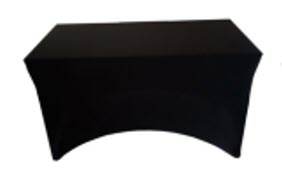 Sufficient seating for up to 6 people
• Total head-table Dimensions: L 300 cm x H 75 cm
(Includes 2 table modules)
• Each module dimensions: L 150 cm x H 75 cm
• For head-table branding, please refer to the *note
below
The head-table will have N&G branding. Self-branding is not permitted
Lectern in Forum Hall and South Hall 2
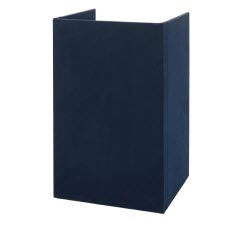
• Lectern Dimensions:
• Width: 70 cm
• Height: 110 cm
The lectern will be branded with general congress branding. Self-branding is not permitted.
For alternative/additional arrangements please contact the Industry Coordinator at yzaiter@kenes.com
Please note that the head table and lectern will be branded with the general N&G Congress branding.
If you are interested to have your own company branding for the head table or lectern, please contact Exposale at: Josev Svec josef.svec@exposale.cz
Please note that Exposale holds exclusivity on providing branding services. They will be able to propose to you a signage that will be attached to the congress branding in the way that it won’t be damaged. The reason is that the conference branding cannot be removed as it can be easily damaged.
All stage change requests must be communicated in advance with the Industry Coordinator, to ensure that there is sufficient time between sessions for implementation.
Symposium Stage set-up deadline: (No changes will be accepted after this date)
Please click here to see the venue map.
Forum Hall
Visual
- LEDWALL 12x4m (3.9pp)
- Video control for the above led wall (all necessary equipment)
- Camera for Speaker on screen (not recording)
- Clicker / ppt advancer
- Timer on stage
- x2 Comfort monitors
- Lectern
Audio
- Full sound system for the hall + monitors
- x2 microphones on lectern
- x4 conference microphones for the panel
- x1 wireless headset mic
- x4 wireless handheld mics (for Q&A)
Lighting
- Stage warm white lighting
- x4 Moving wash heads
- x20 led pars for colour up lighting of backdrop
Necessary technicians for the above systems.In-house – build-in stage will be used.
South Hall 2
Visual
- x3 Projection Screens 3.45×2.05 (front projection, self standing) & x3 Projectors 6500 lumens laser
- Video control for the above projections (all necessary equipment)
- Clicker / ppt advancer
- Timer screen
- x2 Comfort monitors
- Digital Lectern (“smart lectern”)
Audio
- Full sound system for the hall + monitors
- x1 microphones on lectern
- x4 Conference microphones for the panel
- x1 wireless headset mic
- x2 wireless handheld mics (for Q&A)
Lighting
- x4 Stage lights for warm white lighting
- x12 LED pars for colour up lighting of room
Necessary technicians for the above systems.Stage 8x2m 40cm.
Presentations Upload Onsite
If you are using a PowerPoint presentation (or any other PC-based application), please note that you have to deliver it on a USB Memory stick to one of the technicians in the Speakers’ Ready Room as soon as you arrive at the Venue in the morning – and at least 2 hours before the start of the session.
Please note that the meeting computer at the lectern is supplied with Office 2019 (at least) and the native ratio of the projection on the screens in the halls is 16:9.
If you include video clips in your PowerPoint presentation, be sure to test it with the technician in the Speakers’ Ready Room at least 2 hours before the start of the session or as soon as you arrive at the venue in the morning. Please make sure to check it with the technician in the session hall where your lecture is taking place, during a coffee or lunch break prior to your session, at least 30 minutes before the start of the session – even after checking it in the Speakers’ Ready Room.
Important Note for Macintosh Users
To use MAC presentations on the PC compatible conference computer, please note that you need to prepare it according to the instructions below, before taking it to the speaker room:
- Convert it to PowerPoint or PDF. Use a common font, such as Arial, Times New Roman, Verdana etc. (Special characters might be changed to a default font on a PowerPoint-based PC).
- Insert the images as JPG files (and not TIF, PNG or PICT – these images will not be visible on a PowerPoint based PC).
Technical Rehearsal
As previously mentioned, we strongly recommend scheduling a technical rehearsal and testing the presentations during the rehearsal. A 30 min technical rehearsal is offered free of charge; however additional charges may apply, depending on hall availability, rehearsal requirements and overtime of the technicians. Please plan directly with the Audio Visual Coordinator, Mr. Errikos Nikolaos Vidalis evidalis@vdl.gr.
Please submit the final symposium programme using the attached Agenda format via email to yzaiter@kenes.com as early as possible and no later than 5 weeks prior to the meeting. The proposed programme should include:
- Session Title (up to 110 characters including spaces)
- Session Description (up to 200 words, you can also include hyperlinks inside of it)
- Speaker Presentations Titles
- Timing – duration of each speaker presentation and full timing of the agenda
- Speaker/Moderator Full Name
- Speaker/ Moderator Country
- Speaker/ Moderator E-mail
- Speaker/ Moderator Affiliation
- Speaker/ Moderator Bio and Photo (please see specs below)
In case of changes to your symposium title or Programme after submission, please update the Industry Coordinator: Youcef Zaiter at yzaiter@kenes.com
Symposium Promotion
This section includes guidelines which will assist you to prepare promotional items related to your industry symposium, however, kindly refer only to the relevant items in accordance with your sponsorship agreement.
Due to CME/CPD accreditation criteria for this Meeting, the following rules apply:
- When promoting your symposium, please always indicate on any of your promotional materials: This session is not included in main event CME/CPD credit
- Meeting banner should NOT be used in any promotional materials created by the supporter.
- Materials created by companies should NOT utilize the main event marketing look and feel.
- In addition, it is not permitted to use the N&G 2026 logo on any of the symposia materials.
- When promoting your symposium, you are allowed to use the phrase: Official Symposium of N&G2026
Promotional Items
1. Mobile App Push Notification
For supporters entitled to a push notification as per their signed contract, kindly submit the text no later than Friday, 12 March, 2026 via email to yzaiter@kenes.com according to below guidelines:
- Message Title – Maximum 40 characters including spaces
- Message body – Recommended 140 characters including spaces
- Please specify your preferred date and time (local time) when submitting the text.
- We will do our best to accommodate this request. The final schedule of the push will be determined closer to the event, considering the overall push notifications schedule of the event.
- Push notifications will be sent out during official breaks only, in order not to disturb the participants who are inside the session halls when sessions take place.
- We recommend keeping push notifications short and concise. The goal is to get the most important information across quickly and encourage participants engagement.
- Please make sure to indicate company name either on the title or in the message body.
- Kindly note that push notifications look different across the various browsers, device types and operating systems.
2. Mobile App Advert
Please send the file no later than Friday, 27 Febuary2026, via email to yzaiter@kenes.com
File format: PNG or JPG (up to 800 kb)
Size: 780 x 1688px
We recommend avoiding using small text, so the advert can be readable when displayed on a mobile screen.
3. Promotional Email Blast – Exclusive
Sponsor’s entitled to an Industry Mailshot as per their signed contract, please click here for the design requirements. Please make sure to forward these guidelines to your web designer/programmer. Please upload the HTML version of your mailshot and other relevant files together in a zip folder and send us everything with the subject line to Youcef Zaiter at: yzaiter@kenes.com no later than Friday, 27 February.
Important notes:
- In case the webmail is promoting a sponsored session, please include the following disclaimer: This session is not included in the main event CME/CPD credits.
- It is not allowed to use the society logo.
- The event’s banner will be added to the webmail’s header by Kenes.
- The “From” field will be “N&G 2026 Supporters”.
- The exact launch date will be determined by Kenes in due course.
- The E-mail Blast will be sent out to the preregistered delegates who have agreed to receive promotional material from supporters.
- Content received after the deadline may be processed for an additional fee.
Symposium supporters have the option to create signage promoting their symposium according to the below guidelines.
The symposium signage should be produced by the supporter. Maximum dimensions: 85cm wide x 200cm high.
Please make sure to follow the guidelines specified at the beginning of this section.
4. Mini-Program Add
For Sponsors entitled to adverts in the printed program book as per their signed contract, please submit the file please submit the file to yzaiter@kenes.com no later than Thursday, 05th March in one of the following formats at a resolution no less than 300 dpi: EPS, Illustrator, JPG or PDF. Please refer to the diagram HERE for advert dimensions for the final program.
Symposium Signage (Optional)
Symposium supporters have the option to create signage promoting their symposium according to the below guidelines. The symposium signage should be produced by the supporter. Please make sure to follow the guidelines specified at the beginning of this section.
1. Self-standing signage in Session Hall:
- Self-Standing Sign at the Entrance
One stand-alone sign to be placed at the entrance of the session hall 30 minutes prior to the sessions published start time. Maximum dimensions: 85cm wide x 200cm high. Please make sure to indicate the following disclosure on the sign: This session is not included in main event CME/CPD credits.
- Stage Banners
1 x free standing vertical sign to be placed on/next to the stage. Maximum dimensions: 150cm wide x 250cm high.
Branding of the digital lectern (for further details, please refer to Section: Industry Symposia Halls).
2. Self Standing Signage in the Exhibition Area.
The Supporter is entitled to place one sign (W85cm x H200cm) advertising the Symposium on the day of the session only. The sign may be placed in the exhibition area during exhibition opening hours. Please liaise onsite with the Kenes Staff.
'K-Lead' Application – Barcode scanner App
Lead Retrieval systems are a helpful tool for receiving participants’ contact information when they visit your booth. The information obtained by lead retrieval system enables Exhibitors to enhance their database by securing valuable leads for further marketing and communication.
We are pleased to offer you the “K-Lead” Application: exhibitors can download the “K-Lead” app onto their own smart phone or tablet and transform their device into an instant, easy lead retrieval system and capture participants’ full contact information with a quick scan of their badge.
Why Choose Kenes K-Lead App?
- Seamless Integration: Download directly to your device; no extra hardware needed!
- Effortless Scanning: Quickly scan attendee badges to capture leads.
- Customizable Notes: Add personal comments to each lead for better follow-up.
- Instant Access: Get real-time lead information for immediate engagement.
- “Quick Scan” function: Ability to quickly scan delegates as they enter the session hall.
- Universal Compatibility: Download from the Apple Store or Google Play using “Kenes K-Lead App.
Cost per unit – EUR 750 (excluding 4% credit card charges, fees, and VAT if applicable)
The Application should be installed on your company/personal device (tablet/smartphone). Operational information will be sent in due course.
To order “K-Lead” Application, please access the Exhibitor’s Portal https://exhibitorportal.kenes.com
Deadline: TBC
On-site rate of EUR 850 will be applied for orders received after the deadline.
Are you ready to revolutionize the way you collect and manage leads at your next event? Unlock the Power of our new service, K-Lead PLUS:
- Automated Follow-up Emails: Immediately after scanning, send personalized emails to every lead. Make every connection count without lifting a finger!
- Tailored Email Customization: Craft the perfect message with customizable subject lines, email content, and signatures. Attach PDFs to add a polished, personal touch that stands out.
- Timely Engagement: Say goodbye to the hassle of manual follow-ups. K-Lead PLUS handles it by sending tailored emails right after each scan, keeping your brand top of mind.
- Trackable Insights: Monitor how your emails perform with engagement metrics. Learn what works and refine your strategies for maximum impact, ensuring you’re always improving.
- Compatibility: K-Lead Plus requires at least one K-Lead license purchased.
With K-Lead PLUS, every scan is a step towards a stronger business relationship.
Elevate your event networking and turn leads into valuable partnerships with ease and efficiency.
Don’t just meet leads; master the art of follow-up with K-Lead PLUS. Get started today and experience the difference real engagement makes!
Please note that the Device is not included. The Application should be installed on your company/personal device (tablet/smartphone).
How to order K-Lead and K-Lead Plus? -> Please access the Exhibitor’s Portal https://exhibitorportal.kenes.com
Deadline: TBC
Cost per unit – EUR 350 (excluding 4% credit card charges, fees, and VAT if applicable)
Key Notes:
Reliable Data: Participant badge barcodes carry contact details as provided by registrants or their agencies. Note: Group registration may contain generalized information.
Content Responsibility: Information content is managed by the registrant or their agency, not Kenes Group or the Organizing Committee.
Easy Reservation: Secure your Wireless Barcode Reader by returning the completed credit card form.
GDPR Compliance: We’ve updated our privacy policy to comply with the GDPR. Your personal data won’t be shared without consent. Presenting your badge for scanning implies consent to share your details.
Wi-Fi
Free Wi-Fi will be available at the meeting venue. Please be aware that public Wi-Fi capacity is limited. Therefore, it is restricted to email and web browsing activity. Should you require Wi-Fi or an internet line during your symposium, Please refer to the webshop
Meeting Rooms / Hospitality Rooms
Supporters interested in renting a meeting room during N&G 2026 Conference should contact Industry Liaison & Sales, Ms. Renata Gorinstein, Email: rgorinstein@kenes.com
Waste Disposal
Please note that it is the supporter’s responsibility to leave the symposium session hall in a clean and tidy manner once your symposium has finished. Any items such as leaflets, banners, roll-ups must be removed from the hall at the end of your session. Any discarded waste, including promotional material, left behind will be removed by the meeting organizers at the expense of the supporter concerned.
Onsite Badges
Each supporter is entitled up to 5 Symposium badges which allow access to the supporter’s symposium only (Individual names will not appear on the badges). Symposium badges can be collected 2 hours prior to the session from the Registration Desk and should be returned to the desk after the session ends.
Catering
Catering is exclusive to Zatisi Catering and should be ordered in advance. Supporters who wish to order Lunch box for their symposium / food and beverages for the meeting room, are welcome to do so directly with Zatisi.
For orders, contact: jitka.zahradkova@zatisigroup.cz
Hostesses & Temporary Staff Hire
Supporters who wish to order hostess services for their symposium, are welcome to do so directly with: Ivana Dupalova: dupalova@hostesky.cz
Shipping Instructions
The shipping instructions include the following information:
Shipping Instructions – Click Here
Official Handling Tariffs – Click Here
Order Form Warehouse – Click Here
Order Form Direct – Click Here
Label Exhibition Goods – Click Here
The services offered by Merkur Expo Logistics GmbH include:
- Transport, national and international
- Temporary or permanent customs clearances
- Coordination of deliveries, delivery time and slot management
- Unloading, delivery to exhibition-stands, forklifting
- Storage of empty boxes and crates during the event
- On-site assistance and supervision
Merkur has been appointed the official forwarding agent and clearance agent for this Congress and offers the following services: customs clearance, delivery to the stand, freight forwarding, manpower & trolleys for un-loading/loading during build-up and dismantling, storage of empty crates, transportation to and from the Exhibition Hall.
For security, insurance, and efficiency reasons, Merkur is the sole official agent to handle cargo inside the venue.
Booth builders are prohibited from using trolleys during set-up and dismantling periods.
Kindly note that the official agent is the exclusive agent for move in and move out of the venue.
Exhibitors and Booth builders are free to deliver their goods or to pick their goods up from outside the venue. Those who use their own facilities up to the venue are requested to coordinate their
time schedule and unloading of their cargo into the venue with the official logistics agent.
All cargo should be insured from point of origin.
Please Note: All advance shipments and deliveries to the Merkur warehouse, including by courier,
must be coordinated with Merkur.
Contact information:
Mr. Bernd Blum
E-Mail: bernd.blum@merkur-expo.com
Congress Organiser: N&G & Kenes Group
Rue François-Versonnex 7
1207 Geneva, Switzerland
Tel: +41 22 908 0488
Registration
Mr. Angel Todorov
Kenes Group
Email: atodorov@kenes.com
Exhibition Manager
Mr. Youcef Zaiter
Kenes Group
Email: yzaiter@kenes.com
Sponsorship and Exhibition Sales
Ms. Renata Gorinstein
Kenes Group
Email: rgorinstein@kenes.com
Hotel Accommodation
Ms. Alejandra Villafaina
Kenes Group
Email: avillafaina@kenes.com
Freight Handling & Onsite Logistic Agent
Merkur Expo Logistics
Mr. Bernd Blum
E-Mail: bernd.blum@merkur-expo.com
Merkur is the exclusive handler inside the venue.
Contractors:
Furniture/ Booth graphics/ Booth fittings/ Electricity/ Booth Cleaning/ Telecommunications/ Internet etc
Expo Sale
Ms. Linda Škarková
Email: expo@exposale.cz / Linda.Skarkova@exposale.cz
Tel +420 777 725 129
For order form please click here
Rigging is not allowed
In-booth Catering
Zátiší Catering
Email: jitka.zahradkova@zatisigroup.cz
Catering service is exclusive to the venue (Zátiší Catering)
Parking (for small cars)
Please find here more information: Parking at the PCC
Note: Truck parking can be organised directly with Merkur
Security
Please contact Prague CC at: lucie.kreckova@praguecc.cz